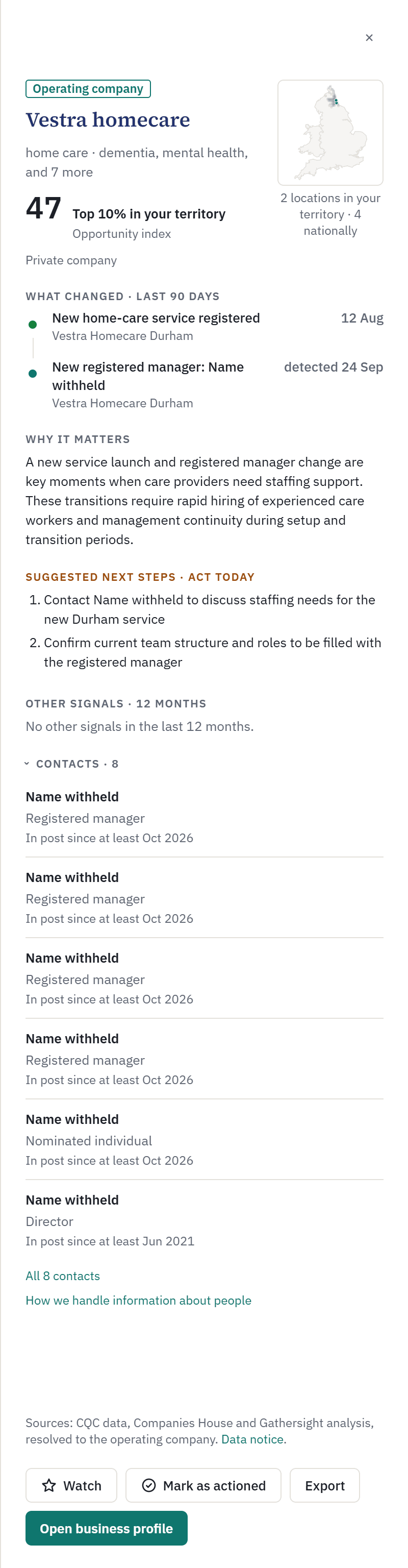
The signal panel, line by line
Click any row on the Deal Desk to open its signal panel. Top to bottom:
- The business: its name (and its registered name, if different), whether it is part of an owner group, what it does, and a small map with how many of its locations are in your territory.
- The Opportunity index and its band, such as “Top 10% in your territory”. See What a signal strength means.
- What changed · last 90 days: the strongest first, each with its date. Where the data source does not say when it happened, the date is the day we detected it.
- Why it matters to what you sell.
- Suggested next steps: two or three, written for a sales call. The heading adds “Act today” for the strongest changes.
- Other signals · 12 months.
- Contacts: people named in the public data sources - registered managers, nominated individuals, directors and people with significant control. Six show, with a link to all of them.
Along the bottom: Watch, Mark as actioned, Export (that business’s last twelve months) and Open business profile.
On Free after the first 14 days, the strongest rows are locked and open an upgrade prompt instead, and names are not shown. See What is on Free, and what is locked.
Was this helpful? Email support@gathersight.com. Updated 16 Oct 2026